Welcome to RTKSurvey.com

Digital Level vs Auto Level Accuracy: What Matters in Precision Leveling?
A digital level may display a staff reading to several decimal places, while an auto level relies on an operator reading a graduated staff through a telescope.
Does that automatically make the digital level more accurate?
Not necessarily. For construction leveling and precise elevation surveys, actual accuracy depends on the instrument, leveling staff, field procedures and environmental conditions.
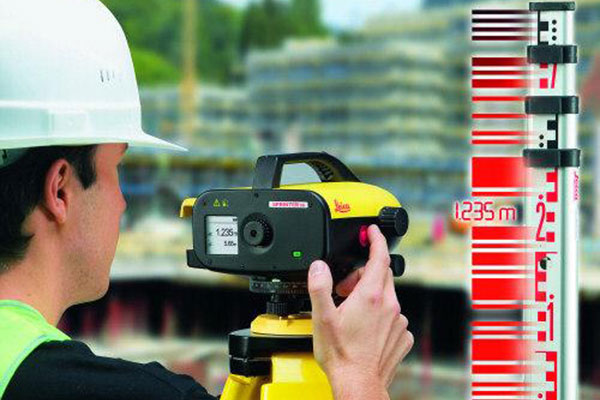
How Do Digital and Auto Levels Measure Elevation?
An auto level uses an optical telescope and an automatic compensator to establish a horizontal line of sight. The surveyor reads a graduated staff and records the observations manually.
A digital level uses an image sensor to recognize a compatible barcode staff. It calculates and typically stores the readings electronically.
The main advantage of digital measurement is reduced manual reading and transcription error. However, both systems remain sensitive to setup and environmental conditions.
For a broader comparison of their features and applications, see our Auto Level vs Digital Level guide.
Which Level Is More Accurate?
A precision digital level paired with a calibrated Invar barcode staff can provide very high repeatability and is often selected for demanding elevation-control work.
A standard construction auto level is generally designed for routine building, grading and site elevation measurements.
However, instrument categories alone do not determine accuracy. A high-grade optical leveling system can outperform an entry-level digital level in appropriate conditions.
When comparing equipment, check the manufacturer's stated standard deviation for a specified leveling procedure, often expressed in millimeters per kilometer of double-run leveling.
Do not confuse display resolution with actual measurement accuracy.
Five Factors That Affect Leveling Accuracy
1. Collimation Error
Collimation error occurs when the instrument's line of sight is not correctly aligned.
A two-peg test or the manufacturer's prescribed checking procedure helps identify this problem.
Keeping backsight and foresight distances approximately equal also helps reduce the effect of residual collimation error.
2. Leveling Staff Quality
The staff is part of the measurement system, not simply an accessory.
A damaged staff, incorrect graduation scale or poorly adjusted staff bubble can introduce errors even when the instrument operates correctly.
For high-precision digital leveling, calibrated Invar barcode staffs are commonly used because of their dimensional stability.
3. Unequal Sight Distances
Large differences between backsight and foresight distances can increase the influence of certain systematic errors.
Consider a leveling setup with a 20 m backsight and a 60 m foresight. Even a small line-of-sight error may produce a noticeable height-difference error.
Balanced sight lengths are therefore important in precise leveling.
4. Temperature and Atmospheric Refraction
Heat rising from asphalt, concrete or exposed soil can distort the apparent staff image.
Strong sunlight and changing temperatures may also affect equipment stability.
Avoid taking precision observations close to hot surfaces, allow equipment to acclimatize, and follow the required survey procedure.
5. Tripod and Turning-Point Stability
A moving tripod or unstable turning point can affect both digital and optical measurements.
Use firm ground, secure tripod legs and stable turning plates or benchmarks.
Automatic data recording cannot compensate for a physically unstable setup.
Field Example: Checking Building Settlement
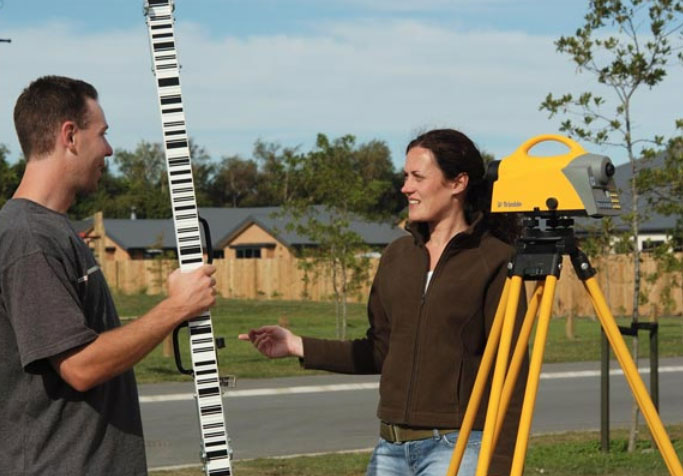
Imagine a construction team monitoring elevation changes at several points around a building.
The project requires consistent measurements over multiple visits.
A digital level with a suitable calibrated staff can help the team follow a repeatable observation sequence and maintain electronic records.
However, if the staff is not vertical or the turning points move between observations, the resulting data may still be unreliable.
For this application, consistent procedures and stable reference benchmarks are just as important as instrument specifications.
When Should You Choose a Digital Level?
A digital level is worth considering when your work involves:
Precision elevation-control networks
Settlement or deformation monitoring
Repeated leveling observations
Projects requiring electronic field records
Long leveling routes with standardized procedures
An auto level may be more practical for routine construction checks, basic site leveling and projects where electronic data recording is unnecessary.
Explore our Digital Levels and Auto Levels to compare equipment for different applications.
Practical Checklist Before Starting a Leveling Survey
| Check | Why It Matters |
|---|---|
| Instrument collimation | Reduces systematic line-of-sight errors |
| Staff condition and calibration | Helps maintain reliable readings |
| Backsight/foresight balance | Limits certain systematic errors |
| Stable tripod and turning points | Prevents movement-related errors |
| Environmental conditions | Reduces refraction and thermal effects |
| Independent closure check | Helps detect accumulated measurement errors |
Final Thoughts
Digital levels offer important advantages in automated readings, repeatability and data management. Auto levels remain useful for many construction and engineering tasks.
Neither instrument guarantees accurate elevations by itself.
For precision leveling, selecting suitable equipment and following a controlled observation procedure are more important than the number of decimal places on the display.
RTKSurvey.com supplies digital levels, auto levels and surveying accessories for construction, engineering and elevation measurement projects worldwide.