Welcome to RTKSurvey.com

GNSS RTK Not Getting Fixed? Common Causes and Solutions
Your GNSS rover is tracking satellites, but the controller still shows RTK Float—or keeps switching between Float and Single. You have waited several minutes, yet it cannot obtain a Fixed solution.
Does the receiver need repairing? Is the correction service down? Or is the problem caused by the surveying environment?

In many cases, the first step is not replacing equipment. It is identifying whether the problem comes from correction delivery, satellite observations, receiver configuration or the field environment.
This guide provides a practical troubleshooting sequence for surveyors using local base stations or network RTK corrections.
Start Here: A 60-Second RTK Troubleshooting Check
Before changing settings, check these five indicators on your field controller:
| Check | What to look for |
|---|---|
| Positioning status | Single, DGNSS, Float or Fixed |
| Correction data | Are valid RTK corrections arriving? |
| Correction age | Are corrections current and updating? |
| Satellite tracking | Are enough usable satellites being tracked? |
| Working environment | Are trees, buildings or reflective surfaces obstructing signals? |
If corrections are missing, investigate the communication link first.
If corrections are arriving but the rover remains in Float, investigate satellite observations, baseline conditions and RTK configuration.
If the rover obtains Fixed but the coordinates are incorrect, that is a different problem. See our RTK Fixed but Wrong Coordinates troubleshooting guide.
1. The Rover Is Not Receiving RTK Corrections
A rover generally cannot calculate a conventional RTK fixed solution without suitable reference observations or corrections.
Even if it tracks many satellites, it may remain in Single or another non-RTK positioning mode when correction data is unavailable.
If You Use NTRIP
Check whether the controller or receiver has an active internet connection.
Then verify:
NTRIP server address and port
Username and password
Selected mountpoint
Correction stream availability
Whether the receiver is receiving and decoding the expected messages
Some network services require an approximate rover position, often sent through an NMEA GGA message, before providing an appropriate correction stream.
A successful login alone does not prove that usable RTK corrections are being received.
If You Use UHF Radio
Confirm that the base station is transmitting and the rover is configured to receive its signal.
Check the radio frequency, channel, protocol, air baud rate and other settings required by the equipment.
Also inspect the radio antenna, connectors and power supply.
Do not change radio transmission power or frequency without considering local regulations and equipment requirements.
For a detailed comparison of correction methods, read RTK Radio vs NTRIP.
2. Correction Age Is Too High or Unstable
Receiving correction messages is not enough if they arrive too late or intermittently.
An unstable communication link can cause correction age to increase, making it difficult for the rover to maintain a reliable RTK solution.
For example, a rover may briefly receive corrections and then lose them as a surveyor walks behind a building or into an area with poor cellular coverage.
What to Do
Watch the correction-age indicator for at least several update cycles.
If it rises repeatedly or stops updating, investigate the communication path.
For NTRIP, check mobile-data coverage and the correction service.
For UHF radio, examine the distance from the base, terrain obstructions, antenna placement and signal conditions.
There is no universal correction-age threshold suitable for every receiver and workflow. Follow the equipment and correction-service guidance.
3. Trees and Buildings Are Blocking GNSS Signals
A rover can track satellites without having enough high-quality observations to resolve carrier-phase ambiguities.
Dense tree cover, tall buildings, bridges and other obstructions can reduce usable satellite visibility.
A common field symptom is a rover that obtains Fixed in an open area but returns to Float near a building.
What to Do
Move to a nearby location with a clearer view of the sky, if the survey task allows it.
Observe whether the number and quality of usable satellites improve.
If the receiver obtains Fixed consistently in open sky but struggles near obstructions, the environment is a likely contributing factor.
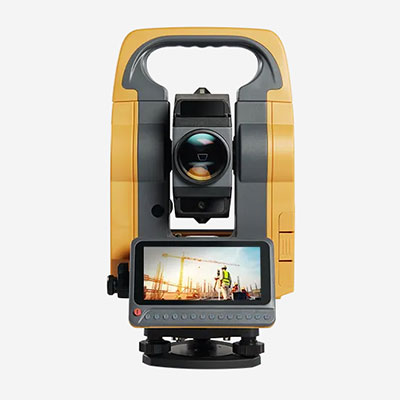
For important points that cannot be observed reliably with GNSS, consider an alternative surveying method such as a total station.
4. Multipath Is Affecting the Observations
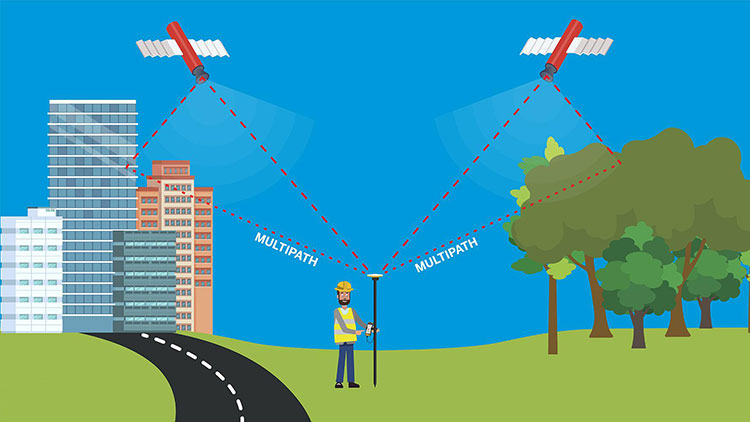
Multipath occurs when GNSS signals reflect from nearby surfaces before reaching the receiver antenna.
Reflective glass, metal structures, vehicles and building facades can create difficult observation conditions.
These reflections can distort measurements and interfere with ambiguity resolution.
How to Recognize It
Possible signs include:
Repeated loss of Fixed near reflective structures
Unstable positioning quality indicators
Different results between occupations at the same point
Better performance after moving away from nearby obstacles
These signs are not definitive proof of multipath, but they provide useful diagnostic clues.
Avoid assuming that a receiver showing many satellites must have good observation quality.
5. The Base Station Is Too Far Away
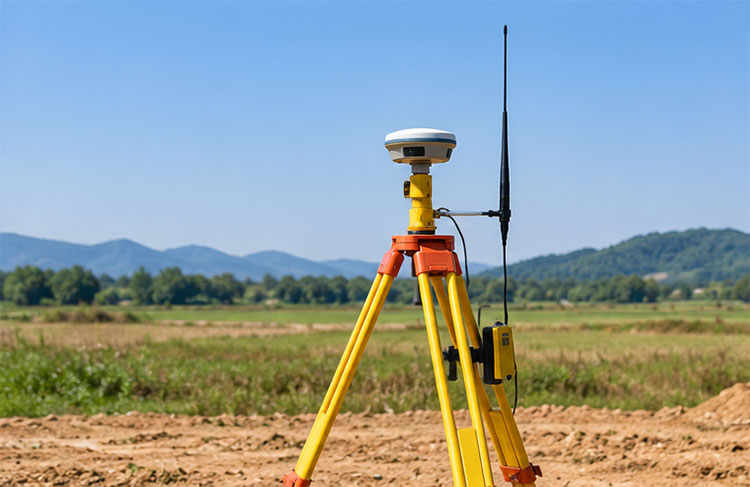
In conventional single-base RTK, increasing the distance between the base and rover can make ambiguity resolution more difficult.
As the baseline grows, atmospheric differences and other distance-dependent errors become harder to model.
The practical working distance depends on the equipment, correction method, satellite conditions and required accuracy.
What to Do
Check the actual baseline distance.
If using a local base station, consider whether a closer, appropriately established reference station would improve the survey configuration.
If using network RTK, confirm that the selected service and mountpoint are suitable for the project area.
Do not assume that a strong radio signal guarantees good RTK positioning over any baseline length.
6. The Base and Rover Have Incompatible Settings
A correction stream may be present but unusable if the base and rover are not configured compatibly.
Possible issues include unsupported message formats, incorrect correction source selection or incompatible receiver settings.
What to Check
Confirm the correction format supported by both devices.
Review the relevant GNSS constellations and signal configuration.
For a mixed-brand base-and-rover setup, verify interoperability using the manufacturers' documentation.
RTCM support is important, but simply seeing the word "RTCM" in both specifications does not guarantee that every message type and configuration will work together.
If possible, test the rover with a known working correction source to isolate the problem.
7. The Receiver Has Lost Carrier-Phase Continuity
RTK positioning depends on reliable carrier-phase observations.
A cycle slip occurs when the continuity of a carrier-phase measurement is interrupted.
Obstructions, signal interference and tracking interruptions can cause cycle slips.
After such an interruption, the receiver may need to resolve ambiguities again before returning to Fixed.
What to Do
Check whether the problem appears after moving through obstructed areas or when the receiver experiences unstable signal tracking.
Allow the receiver to recover under suitable observation conditions.
If the issue repeatedly occurs in clear open sky with a stable correction link, review the antenna connection, firmware, receiver configuration and equipment diagnostics.
Restarting the receiver may help recover from a temporary software or communication fault, but it does not remove persistent environmental problems.
8. The RTK Configuration or Equipment Needs Attention
If corrections are current, satellite conditions are favorable and the baseline is appropriate, review the remaining configuration and equipment factors.
Check:
Whether the correct positioning mode is selected
Whether relevant GNSS signals are enabled
Whether firmware versions are appropriate and compatible
Whether external antennas or cables are correctly connected
Whether the receiver reports hardware or tracking warnings
When troubleshooting, change one setting at a time and record the original configuration.
This makes it easier to determine which action actually resolved the problem.
A Practical Field Example: Float Near a Building
Consider a survey crew using an NTRIP-connected rover for construction stakeout.
The rover obtains Fixed in an open parking area. Corrections are updating normally.
As the operator approaches a steel-framed building, the status changes to Float. The internet connection remains active, and correction age stays within the receiver's normal operating range.
The crew moves back into the open area, where the rover obtains Fixed again.
In this hypothetical example, the observations suggest that satellite obstruction or multipath is more likely than an NTRIP login problem.
The crew should investigate the observation environment rather than repeatedly changing correction-server settings.
If the required point cannot be measured reliably using GNSS, a suitable total station workflow may be more appropriate.
When Should You Suspect a Receiver Problem?
A receiver that struggles to obtain Fixed is not necessarily defective.
Before requesting repair or replacement, compare its performance under controlled conditions.
Use an open-sky location, a verified correction source and a suitable baseline.
If another correctly configured receiver works reliably under comparable conditions while the suspect receiver repeatedly fails, further equipment diagnostics may be justified.
However, differences in antenna design, supported signals, firmware and receiver settings should be considered before drawing conclusions.
For buyers evaluating replacement equipment, our How to Choose a GNSS RTK Receiver guide covers practical selection factors.
Frequently Asked Questions
Why Is My RTK Rover Stuck in Float?
Common causes include poor satellite observations, multipath, excessive baseline distance, correction problems and incompatible receiver settings. Start by checking correction availability and observation conditions.
Can RTK Get Fixed Without Internet?
Yes. A rover can receive corrections through a compatible local radio link instead of NTRIP over the internet.
Why Does RTK Work in Open Areas but Not Under Trees?
Trees can obstruct and degrade satellite signals, making carrier-phase ambiguity resolution more difficult.
Does More Satellites Always Mean Faster RTK Fixed?
No. The quality, geometry and continuity of usable observations matter, not just the satellite count.
How Long Should I Wait for RTK Fixed?
There is no universal waiting time. Initialization depends on receiver capability, correction quality, baseline length and observation conditions. If the rover remains in Float, investigate the cause rather than waiting indefinitely.
Is RTK Fixed Always Accurate?
No. Fixed indicates an ambiguity-resolution state, not guaranteed accuracy in the project's coordinate system. For more information, see RTK Fixed vs Float vs Single.
Final Checklist Before Continuing the Survey
Before collecting critical survey points, confirm that:
The rover receives suitable, current corrections.
Satellite observations are sufficiently reliable.
The baseline and correction method are appropriate.
The receiver configuration is correct.
The solution meets the project's required quality criteria.
Independent control checks confirm acceptable coordinate accuracy.
A Fixed indicator is useful, but it should not replace field verification.
Need GNSS RTK Equipment for Your Project?
RTK troubleshooting often begins with communication and observation conditions rather than hardware replacement.
However, equipment capability, correction compatibility and field software also affect how efficiently a surveying team works.
RTKSurvey.com supplies multi-brand GNSS RTK receivers for construction, engineering and land surveying applications.
If you are sourcing equipment for a surveying company or distribution business, contact RTKSurvey.com with your application, preferred correction method and destination country to discuss suitable options.